How to Fix Login Issues in a Cloud Platform?
Login issues in a cloud platform usually occur due to incorrect credentials, multi-factor authentication failures, browser or network problems, account permission errors, or security restrictions triggered by unusual activity. Major cloud providers such as Amazon Web Services, Microsoft Azure, and Google Cloud use strict authentication and identity controls to protect user accounts. While this improves security, it can also result in temporary access issues if configurations are incorrect.
This comprehensive guide explains how to fix cloud platform login problems, covering identity verification, MFA issues, browser and network troubleshooting, IAM permission errors, SSO failures, and preventive security best practices.
What Is Cloud Computing?
Cloud computing is the delivery of computing services over the internet (“the cloud”). These services include:
-
Servers
-
Storage
-
Databases
-
Networking
-
Software
-
Analytics
-
Artificial intelligence
Users pay only for what they use, similar to utilities like electricity or water. This eliminates the need for owning physical infrastructure.
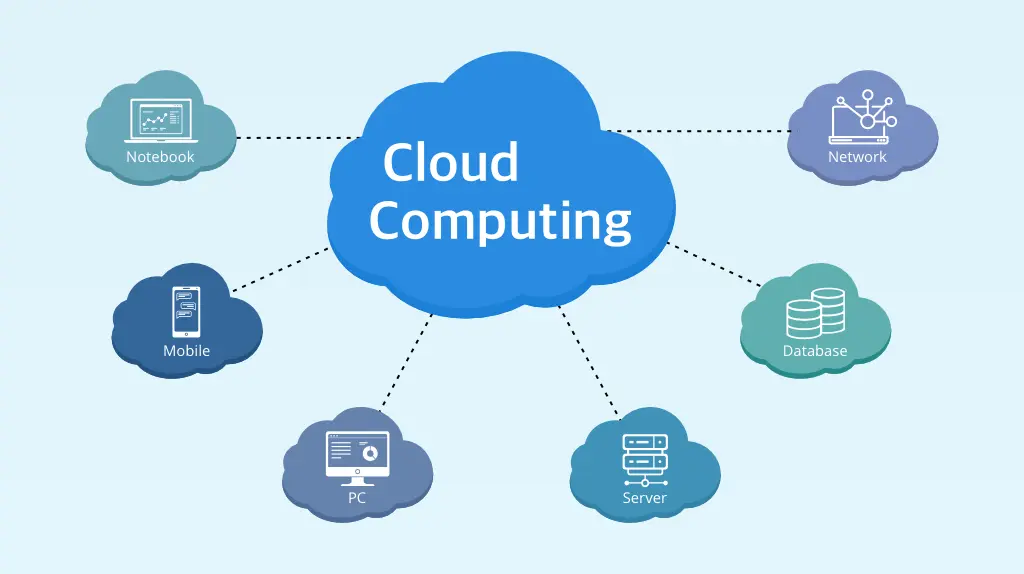
How Cloud Computing Works
Cloud computing relies on large networks of remote data centers. These data centers house servers that store data and run applications. When a user accesses a cloud service, their request is processed by these remote servers and delivered through the internet.
Key components include:
-
Virtualization technology
-
High-speed networks
-
Distributed data centers
-
Automated resource management
This architecture allows rapid scaling, high availability, and efficient resource use.
Key Characteristics of Cloud Computing
Cloud computing is defined by several core characteristics:
4.1 On-Demand Self-Service
Users can access resources automatically without human interaction.
4.2 Broad Network Access
Services are available through standard devices like laptops, smartphones, and tablets.
4.3 Resource Pooling
Providers serve multiple customers using shared infrastructure.
4.4 Rapid Elasticity
Resources can scale up or down quickly based on demand.
4.5 Measured Service
Usage is monitored and billed based on consumption.
Types of Cloud Computing (Deployment Models)
Cloud computing is categorized into deployment models based on ownership and access.
5.1 Public Cloud
Public cloud services are owned and operated by third-party providers. Resources are shared among multiple users.
Features:
-
Cost-effective
-
Highly scalable
-
No infrastructure maintenance
Examples: AWS, Azure, Google Cloud
Uses:
-
Web hosting
-
Application development
-
Data analytics
5.2 Private Cloud
Private clouds are dedicated to a single organization.
Features:
-
Enhanced security
-
Greater control
-
Custom configurations
Uses:
-
Financial institutions
-
Healthcare organizations
-
Government agencies
5.3 Hybrid Cloud
Hybrid cloud combines public and private cloud environments.
Features:
-
Flexibility
-
Data optimization
-
Cost control
Uses:
-
Data-sensitive workloads
-
Seasonal demand management
5.4 Multi-Cloud
Multi-cloud uses services from multiple cloud providers.
Features:
-
Vendor flexibility
-
Improved reliability
-
Optimized performance
Uses:
-
Enterprise resilience
-
Specialized workloads
Cloud Computing Service Models
Cloud services are also categorized by what the provider manages versus what the user manages.
6.1 Infrastructure as a Service (IaaS)
IaaS provides virtualized computing resources.
Includes:
-
Virtual machines
-
Storage
-
Networks
Users manage: Operating systems, applications
Use cases:
-
Website hosting
-
Disaster recovery
-
Development environments
6.2 Platform as a Service (PaaS)
PaaS provides a development platform.
Includes:
-
Runtime environments
-
Databases
-
Development tools
Users manage: Applications and data
Use cases:
-
App development
-
API creation
-
Software testing
6.3 Software as a Service (SaaS)
SaaS delivers complete software applications over the internet.
Includes:
-
Email services
-
CRM systems
-
Collaboration tools
Users manage: Only data and settings
Use cases:
-
Business productivity
-
Communication
-
Customer management
Benefits of Cloud Computing
Cloud computing offers numerous advantages.
7.1 Cost Efficiency
No upfront hardware investment; pay-as-you-go pricing.
7.2 Scalability
Resources scale instantly based on demand.
7.3 Accessibility
Access services from anywhere with internet.
7.4 Reliability
Built-in redundancy and backup systems.
7.5 Security
Advanced encryption, monitoring, and compliance tools.
Uses of Cloud Computing in Real Life
Cloud computing is used across almost every industry.
8.1 Business and Enterprise
-
Data storage and backup
-
ERP and CRM systems
-
Remote collaboration
8.2 Education
-
Online learning platforms
-
Virtual classrooms
-
Digital libraries
8.3 Healthcare
-
Electronic health records
-
Telemedicine
-
Medical data analytics
8.4 Banking and Finance
-
Online banking
-
Fraud detection
-
Secure transactions
8.5 Media and Entertainment
-
Video streaming
-
Game hosting
-
Content delivery networks
8.6 E-Commerce
-
Online stores
-
Inventory management
-
Customer analytics
8.7 Government and Public Services
-
Citizen portals
-
Data transparency
-
Smart city solutions
Cloud Computing and Security
Security is a major concern, but cloud providers implement robust protections.
Common Security Features:
-
Data encryption
-
Identity and access management
-
Firewalls and intrusion detection
-
Compliance certifications
Users are responsible for configuring security correctly.
Challenges of Cloud Computing
Despite benefits, cloud computing has challenges.
-
Internet dependency
-
Data privacy concerns
-
Vendor lock-in
-
Downtime risks
-
Cost management complexity
Proper planning helps mitigate these risks.
Cloud Computing vs Traditional Computing
| Feature | Cloud Computing | Traditional Computing |
|---|---|---|
| Cost | Operational | Capital |
| Scalability | High | Limited |
| Maintenance | Provider-managed | User-managed |
| Accessibility | Global | Local |
Cloud Computing for Small Businesses
Cloud services enable small businesses to:
-
Compete with large enterprises
-
Reduce IT costs
-
Scale operations quickly
This democratizes technology access.
Cloud Computing for Developers
Developers benefit from:
-
Rapid deployment
-
Automated testing
-
Global infrastructure
Cloud accelerates software innovation.
Cloud Computing and Emerging Technologies
Cloud computing powers:
-
Artificial intelligence
-
Machine learning
-
Internet of Things
-
Big data analytics
These technologies depend on scalable cloud resources.
Environmental Impact of Cloud Computing
Cloud providers optimize energy usage through:
-
Efficient data centers
-
Renewable energy sources
-
Resource optimization
This often reduces environmental impact compared to traditional IT.
Choosing the Right Cloud Model
Consider:
-
Budget
-
Data sensitivity
-
Compliance requirements
-
Scalability needs
The right model depends on business goals.
Future of Cloud Computing
Future trends include:
-
Serverless computing
-
Edge computing
-
AI-powered cloud services
-
Increased automation
Cloud will continue to evolve rapidly.
Why Cloud Platform Login Issues Happen
Cloud platforms are designed with strong security frameworks to protect sensitive data, applications, and infrastructure. Unlike traditional software, cloud services rely heavily on identity management, access policies, and real-time security monitoring. Even a small configuration change can prevent successful login.
Fix Login Issue in Cloud Platform Login problems can affect:
-
Individual cloud users
-
Administrators
-
Developers
-
Entire organizations
Understanding the root cause is the first step toward restoring access quickly and safely.
Common Symptoms of Cloud Login Issues
Cloud login problems present themselves in different ways, Fix Login Issue in Cloud Platform including:
-
Incorrect username or password errors
-
Account temporarily locked
-
MFA code not working
-
Access denied or insufficient permissions
-
Endless sign-in loops
-
White screen or stuck loading page
-
SSO authentication failures
Each symptom points to a specific category of issue.
Fix Login Issue in Cloud Platform Verify Username and Password First
The most basic but common cause of login failure is incorrect credentials.
Steps to Check:
-
Ensure Caps Lock is off
-
Re-enter credentials manually instead of auto-fill
-
Confirm you are using the correct account (root, admin, or user)
-
Reset the password if unsure
Cloud platforms enforce strict password policies, so even minor mistakes cause failures.
Fix Login Issue in Cloud Platform Caused by Browser Problems
Browser-related issues often interfere with cloud authentication.
Recommended Fixes:
-
Clear browser cache and cookies
-
Disable browser extensions temporarily
-
Try a different browser
-
Use private or incognito mode
-
Update the browser to the latest version
Cloud dashboards rely on modern web technologies, and outdated browsers often fail to load correctly.
Check Internet and Network Connectivity
Unstable or restricted networks can block authentication requests.
Network Troubleshooting:
-
Restart your router
-
Switch from Wi-Fi to wired connection
-
Disable VPN temporarily
-
Avoid corporate firewalls that block cloud domains
Some cloud providers block sign-ins from suspicious IP ranges.
Fix Multi-Factor Authentication (MFA) Login Issues
MFA is one of the most common causes of cloud login problems.
Common MFA Issues:
-
Expired or incorrect verification codes
-
Time mismatch on authenticator apps
-
Lost phone or security key
-
SMS delivery failure
Solutions:
-
Sync time on your mobile device
-
Use backup authentication methods
-
Generate recovery codes if available
-
Contact the administrator to reset MFA
MFA failures often require admin-level intervention.
Resolve Account Lockouts and Suspicious Activity Blocks
Cloud platforms may temporarily lock accounts after:
-
Multiple failed login attempts
-
Logins from new countries or devices
-
Suspicious automation behavior
How to Fix:
-
Wait for the lockout period to expire
-
Reset your password
-
Verify identity through security prompts
-
Review recent account activity
Security locks are automatic and designed to prevent breaches.
Fix IAM Permission and Role Issues
Incorrect Identity and Access Management (IAM) settings can block login.
Common IAM Problems:
-
Missing login permissions
-
Incorrect role assignment
-
Expired access policies
-
Revoked user access
Solution:
-
Ask an administrator to review permissions
-
Confirm your role includes console access
-
Ensure policies are active and not expired
IAM issues are especially common in enterprise environments.
Troubleshooting Single Sign-On (SSO) Login Issues
SSO allows cloud access using corporate credentials, but misconfigurations can block login.
Common SSO Causes:
-
Expired SSO session
-
Identity provider outage
-
Incorrect domain configuration
-
Changed email address
Fixes:
-
Log out of all sessions
-
Sign in directly via the identity provider
-
Clear browser cookies
-
Contact IT to re-sync SSO settings
SSO issues often originate outside the cloud platform itself.
Fix Cloud Login Issues on Mobile Devices
Cloud apps and dashboards behave differently on mobile devices.
Mobile Fixes:
-
Update the cloud app
-
Clear app cache
-
Re-install the app
-
Disable battery optimization
-
Check device time and date
Incorrect device time causes authentication token failures.
Reset Cloud Account Password Safely
If login continues to fail, a password reset is recommended.
Best Practices:
-
Use a strong, unique password
-
Avoid reusing old passwords
-
Update password on all connected devices
-
Store credentials securely
Password resets often resolve persistent login issues.
Check Cloud Service Status and Outages
Sometimes the issue is not on your side.
What to Do:
-
Check the provider’s service status page
-
Look for authentication or IAM outages
-
Monitor regional service disruptions
Login failures may occur during maintenance or outages.
Fix Login Issues Due to Expired Accounts or Subscriptions
Some cloud platforms restrict access if:
-
Subscription expired
-
Payment failed
-
Trial period ended
Solution:
-
Update billing details
-
Renew subscription
-
Contact billing support
Account status directly affects login permissions.
Troubleshooting API and CLI Login Issues
Developers may face login errors using CLI or APIs.
Fixes:
-
Refresh authentication tokens
-
Reconfigure CLI credentials
-
Verify API keys are active
-
Check region settings
CLI authentication differs from web console login.
Advanced Security Restrictions and IP Blocks
Cloud providers may block:
-
Certain countries
-
Anonymous IPs
-
Tor networks
Solution:
-
Use a trusted network
-
Whitelist IP addresses
-
Disable anonymizing services
Security policies vary by organization.
Cloud Login Issues After Account Changes
Changes that trigger login failures include:
-
Email address updates
-
Role changes
-
Organization restructuring
Fix:
-
Confirm updated credentials
-
Re-accept invitations
-
Reassign permissions
Account changes require re-authentication.
Best Practices to Prevent Cloud Login Issues
Preventive measures reduce future problems:
-
Keep recovery methods updated
-
Use password managers
-
Enable backup MFA options
-
Monitor account activity regularly
Proactive security improves reliability.
When to Contact Cloud Support
Contact official support if:
-
Account access is completely blocked
-
MFA reset is required
-
IAM permissions cannot be changed
-
Security flags persist
Support teams can verify ownership and restore access.
Fix Login Issue in Cloud Platform: FAQ
Why can’t I log in to my cloud account?
- Most login issues are caused by credential errors, MFA failures, or permission problems.
Does VPN cause cloud login issues?
- Yes, VPNs can trigger security blocks or MFA challenges.
How long does cloud account lockout last?
- Lockout duration varies by provider and security policy.
Can cloud support unlock my account?
- Yes, after proper identity verification.
Fix Login Issue in Cloud Platform: Final Thoughts
Login issues in a cloud platform are usually security-related and designed to protect sensitive resources. While frustrating, most problems can be resolved by verifying credentials, fixing MFA settings, reviewing permissions, and ensuring a stable network environment. Understanding how cloud authentication works allows faster resolution and prevents repeated access failures.
Cloud Computing: FAQ
What is cloud computing in simple terms?
- It is using internet-based servers to store and process data instead of local computers.
Is cloud computing safe?
- Yes, when configured properly with security best practices.
Who uses cloud computing?
- Businesses, governments, developers, and individuals worldwide.
Is cloud computing expensive?
- It is usually cost-effective due to flexible pricing.
Best Practices for Using Cloud Computing
-
Monitor usage and costs
-
Secure access controls
-
Backup data regularly
-
Choose reputable providers
Cloud Computing Platform Final Thoughts
Cloud computing is a foundational technology of the modern digital world. It offers flexibility, scalability, efficiency, and innovation across industries. By understanding what cloud computing is, its types, and its uses, individuals and organizations can make informed decisions and fully leverage its potential.